

Blackmagic Camera for iOS v3.3 Brings Apple Watch Integration, Focus and Zoom Demands and More
 admin
admin 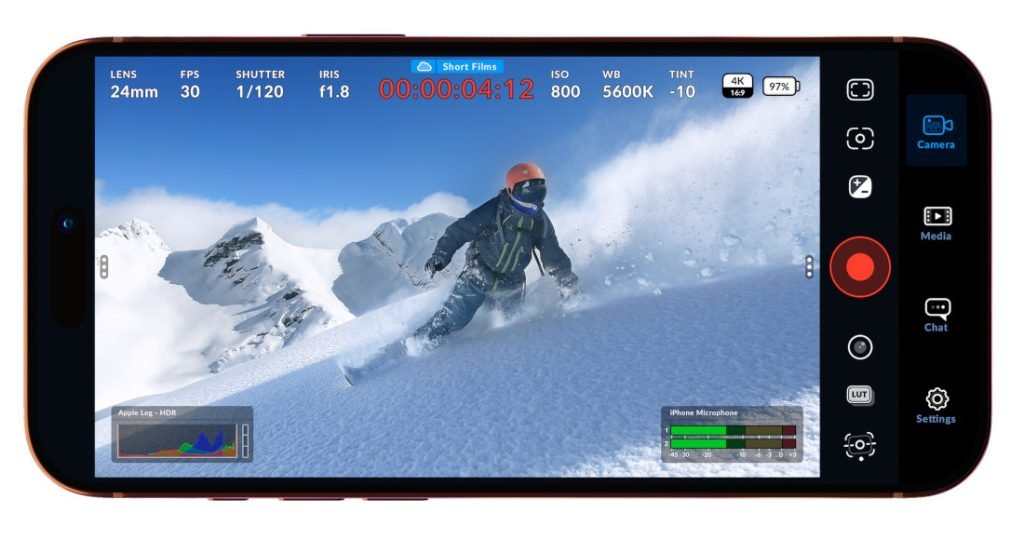
The world of mobile filmmaking continues to evolve rapidly, and the latest update from Blackmagic Design is proof of that. With the release of Blackmagic Camera for iOS v3.3, creators now have access to even more powerful tools that bring professional-grade video production directly to their smartphones.
This update introduces Apple Watch integration, advanced focus and zoom demand controls, and enhanced usability features, making it a game-changer for videographers, content creators, and filmmakers using iPhones.
In this blog, we’ll explore everything new in this update, its benefits, and how it is reshaping mobile filmmaking.
What is Blackmagic Camera for iOS?
Blackmagic Camera is a professional video recording app designed to give users full control over their camera settings—similar to high-end cinema cameras. Unlike standard smartphone camera apps, it offers manual control over:
- ISO
- Shutter speed
- White balance
- Frame rate
- Focus and zoom
With version 3.3, the app takes a big leap forward by integrating with wearable tech and improving control precision.
Apple Watch Integration: A Game-Changer for Filmmakers
One of the most exciting additions in v3.3 is the integration with the Apple Watch.
Key Features of Apple Watch Integration:
- Remote start/stop recording
- Live monitoring from your wrist
- Quick access to key camera controls
- Ideal for solo creators and vloggers
This feature is especially useful for creators who shoot alone or need to control the camera from a distance. Whether you’re filming a YouTube video, interview, or cinematic shot, your Apple Watch becomes a powerful remote control.
Why It Matters:
Previously, controlling shots remotely required extra equipment or assistance. Now, filmmakers can manage everything directly from their wrist, saving both time and effort.
Focus and Zoom Demand Controls
Another standout feature in this update is the introduction of Focus and Zoom Demand controls, bringing a cinema-style shooting experience to iPhones.
What Are Focus and Zoom Demands?
In professional filmmaking, “demands” refer to physical controls used to adjust focus and zoom smoothly during a shot. With v3.3, Blackmagic brings this experience digitally.
Benefits:
- Smooth and precise focus pulling
- Controlled zoom transitions
- Better cinematic shots
- Enhanced storytelling
This feature is particularly useful for creating professional content like:
- Short films
- Music videos
- Commercial ads
- Instagram reels and YouTube videos
Now, even mobile creators can achieve DSLR-level control without needing expensive gear.
Improved User Interface and Workflow
Blackmagic Camera v3.3 also focuses on improving the overall user experience.
Enhancements Include:
- Cleaner layout for faster navigation
- Improved touch responsiveness
- Better accessibility of controls
- Streamlined shooting workflow
These improvements ensure that both beginners and professionals can use the app efficiently.
Why This Update Matters for Content Creators
The rise of platforms like YouTube, Instagram, and TikTok has made high-quality video content more important than ever.
With Blackmagic Camera v3.3:
- You don’t need expensive cameras to create cinematic content
- Your iPhone becomes a professional filmmaking tool
- You can shoot, control, and monitor—all from one ecosystem
For Different Users:
1. YouTubers & Influencers
- Easier solo shooting
- Better control over video quality
2. Filmmakers
- Professional-grade manual controls
- Cinematic shooting features
3. Businesses & Marketers
- High-quality promotional videos
- Cost-effective content production
Comparison with Standard Camera Apps
| Feature | Standard Camera App | Blackmagic Camera v3.3 |
|---|---|---|
| Manual Controls | Limited | Advanced |
| Apple Watch Support | No | Yes |
| Focus/Zoom Control | Basic | Professional |
| Cinematic Features | Minimal | Extensive |
Clearly, Blackmagic Camera stands out as a professional tool for serious creators.
Compatibility and Availability
Blackmagic Camera for iOS is available on the Apple App Store and works best with newer iPhone models that support advanced video capabilities.
Requirements:
- iOS-supported iPhone
- Compatible Apple Watch (for remote control features)
How to Use the New Features Effectively
To get the most out of version 3.3:
1. Set Up Apple Watch Control
- Install the companion app
- Pair with your iPhone
- Use it for remote shooting
2. Master Focus and Zoom Demands
- Practice smooth transitions
- Use sliders for cinematic effects
- Combine with manual exposure settings
3. Optimize Your Shooting Setup
- Use a tripod or stabilizer
- Record in high resolution (4K/6K if available)
- Adjust lighting for better output
The Future of Mobile Filmmaking
Blackmagic Camera v3.3 shows how mobile filmmaking is closing the gap with traditional cinema cameras.
With continuous updates and features like:
- Remote control via wearables
- Advanced lens controls
- Professional-grade color and exposure tools
Smartphones are becoming powerful filmmaking devices.
Companies like Apple Inc. and Blackmagic Design are pushing the boundaries, enabling creators to produce studio-quality content from their pockets.
Final Thoughts
The release of Blackmagic Camera for iOS v3.3 is a major milestone in mobile video production. With features like Apple Watch integration and Focus/Zoom Demands, it brings professional filmmaking tools to everyday users.
Whether you’re a beginner or an experienced filmmaker, this update empowers you to create stunning, cinematic content without investing in expensive equipment.
If you’re serious about video content creation, this app is definitely worth exploring.
About The Author